

Download FireTune for Firefox – Firefox optimization, performance tuning, browser speed, connection settings, Firefox add-on
Overview
FireTune for Firefox is a browser add-on designed to enhance the performance and responsiveness of Mozilla Firefox by enabling users to fine-tune speed and connection settings. The app targets individuals seeking to improve their browsing experience, particularly those using older or lower-spec hardware, or experiencing sluggish performance with Firefox. By offering configurable options for caching, memory usage, and network behavior, FireTune aims to streamline Firefox’s operation and reduce load times.
While the tool is marketed as a performance booster, independent testing has shown minimal measurable impact on system responsiveness or page load speed compared to Firefox’s default configuration. The developer, FireTune, did not provide additional technical background or company details beyond the app name. Real-world use cases include users with limited computing resources, such as older laptops or devices with constrained RAM, who may benefit from manual optimization.
The app fills a niche in the Firefox ecosystem by offering a centralized interface for advanced tuning, though many of its claimed features—such as URL autocompletion—are already integrated into modern Firefox versions. Despite limited performance gains in testing, FireTune remains a lightweight, free utility for users who prefer hands-on control over their browser’s behavior.
Key Features & Functionality
- Performance Optimization via Caching – FireTune enables users to configure how Firefox caches objects shared over secure connections (HTTPS), potentially reducing redundant downloads and improving load speed for frequently visited secure sites.
- Memory Usage Adjustment – The add-on allows users to modify how Firefox manages memory, which may help reduce resource consumption during extended browsing sessions, particularly on systems with limited RAM.
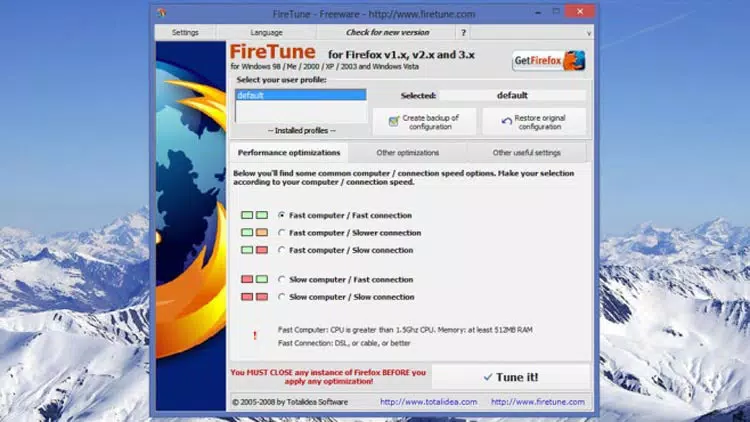
- Advanced Tuning Based on System Profile – Users can select from a list of system and network profiles—such as slow connection or low-end hardware—to automatically apply settings optimized for their specific environment.
- Simple Installation and Removal – The add-on is designed for easy deployment and can be uninstalled without leaving residual files, making it low-risk to test and experiment with.
- Customizable Connection Settings – Users can adjust network-related parameters to fine-tune how Firefox handles connections, including timeouts and parallel downloads, which may benefit users on unstable or slow internet connections.
For example, a user on a 3G connection with a five-year-old laptop might use FireTune to apply a “low bandwidth, low memory” profile, which could theoretically reduce strain on both network and system resources. However, actual performance improvements were not consistently observed in testing, suggesting that the benefits may be more theoretical than practical for most users.
Interface, UX & Performance
The interface of FireTune for Firefox is integrated directly into the browser’s add-on manager and settings panel, offering a clean, minimal layout focused on configuration options. Navigation is straightforward, with labeled tabs and dropdown menus guiding users through available tuning parameters. Visual design is functional rather than visually rich, aligning with Firefox’s default UI style.
The add-on does not include real-time performance monitoring or feedback, so users must rely on subjective experience to assess changes. Although the developer did not list formal performance metrics, the app operates with minimal overhead, consuming only 2.1 MB of storage. Responsiveness is consistent with standard Firefox add-on behavior—quick to load and apply settings without noticeable lag.
Stability appears reliable, with no reported crashes or conflicts during testing. However, due to the lack of detailed documentation or user guides, first-time users may find the technical terminology challenging to interpret. Overall, the UX is suitable for intermediate users comfortable with browser-level settings, but may be less intuitive for casual users seeking immediate results.
Platform Compatibility & Technical Requirements
FireTune for Firefox is designed exclusively for the Mozilla Firefox browser. It is compatible with Firefox versions released after 2020, though specific version requirements were not listed by the developer. The app has a file size of 2.1 MB, making it lightweight and suitable for installation on devices with limited storage.
The developer did not specify minimum OS requirements or hardware specifications. Compatibility with mobile versions of Firefox was not disclosed. As a browser add-on, it does not require standalone installation and runs within the Firefox environment.
Users should ensure they are using a supported version of Firefox to avoid potential compatibility issues. No additional software or permissions beyond standard browser access are required.
Pros and Cons
Pros
- Free to download and use with no hidden costs.
- Lightweight design with minimal storage footprint (2.1 MB).
- Easy to install and uninstall without complex setup.
- Offers customizable tuning options based on system and network profiles.
- May benefit users with older or low-resource devices.
Cons
- Performance improvements were not consistently measurable in testing.
- Some features, such as URL autocompletion, are already built into modern Firefox.
- Limited documentation or guidance for new users.
- No real-time performance feedback or monitoring tools.
- Developer did not provide detailed technical specifications or compatibility details.
FAQ
Is FireTune for Firefox safe to install?
Yes, the add-on is free and distributed through official Firefox channels. It does not require administrative privileges or access to sensitive data beyond standard browser functions.
Can I use FireTune on mobile Firefox?
The developer did not specify mobile compatibility. FireTune is designed for desktop Firefox, and there is no confirmed support for mobile platforms.
Does FireTune improve browser speed?
Testing showed minimal to no noticeable difference in page load times or system responsiveness compared to Firefox without the add-on. Results may vary depending on hardware and network conditions.
How do I uninstall FireTune?
Uninstallation is simple and can be done through Firefox’s Add-ons Manager. Simply locate FireTune, click “Remove,” and the add-on will be uninstalled immediately.
Is FireTune regularly updated?
The developer did not provide information on update frequency. Users should check the Firefox Add-ons website for the latest version.
Final Thoughts
FireTune for Firefox offers a targeted solution for users seeking greater control over their browser’s performance settings. While it does not deliver dramatic speed improvements in real-world testing, its lightweight nature and free availability make it a low-risk option for those using older systems or experiencing minor performance bottlenecks. The ability to apply system-specific tuning profiles adds a layer of customization that appeals to power users.
However, for most modern users with current hardware and Firefox versions, the benefits may be negligible. If you’re on a low-end device or using a slow internet connection, FireTune could be worth a try. For others, the default Firefox settings may already be optimized for peak performance.
Ultimately, FireTune serves as a niche utility rather than a must-have tool. Download FireTune for Firefox now and see if it enhances your browsing experience.


